AImoji Keyboard - AI Stickers
- 4.6
- Rating
- 10.00K
- Installs
- Free
- Price
 Analysis by App-foxy
I tend to judge a keyboard by what happens in the small moments: replying while walking between tasks, finding the right expression in a group chat, or trying to make a message feel personal without spending five minutes decorating it. AImoji Keyboard - AI Stickers approaches that problem through personalization. It is an Android app from Alef Network that combines a custom keyboard experience with AI-oriented sticker and theme creation, rather than treating the keyboard as a fixed utility.
That makes it interesting for people who use stickers as part of everyday conversation and want something more individual than the usual emoji panel. The app is free to install, rated for Everyone, and sits in the personalization category. Its current release is version 1.2.2, and it supports devices running Android 6.0 or later. There are optional in-app purchases ranging from $1.49 to $39.99 per item, so the basic entry point is easy, but anyone who wants to explore every paid option should keep that pricing structure in mind.
How the keyboard feels in everyday use
I find a keyboard easiest to judge when I stop thinking about its appearance and notice what I actually do with it: whether I can get back to a plain reply quickly, and whether a custom element feels worth the extra choice. That everyday rhythm also gives me a useful way to think about trust—especially before using a keyboard in conversations where I would rather keep things simple.
You May Also Like

 AccuWeather: Weather Radar
AccuWeather Review: A Quick, Clear Forecast for Everyday Decisions
For everyday plans, the best forecast is the one you can understand quickly. AccuWeather makes rain timing, radar, and local conditions easy to act on, with a few trade-offs.

 Hill Climb Racing
Why Hill Climb Racing Still Turns Crashes Into One More Run
A tiny car, a bumpy hill and one more upgrade: Hill Climb Racing keeps resurfacing because its simple chaos makes every near-miss feel personal.

 AliExpress - Shopping App
AliExpress Makes Global Shopping Feel Personal, but Shoppers Bear the Risk
AliExpress turns a global marketplace into a pocket-sized discovery engine. Its reach is useful, its shopping loop compelling, and its trade-offs easy to miss.

 Lords Mobile: Kingdom Wars
Lords Mobile Is a Kingdom-Building Routine, Not a Quick Match
A case-by-case verdict on the building, battles, device demands, and social commitments that make Lords Mobile rewarding for some players and exhausting for others.

 PDF Scanner app - TapScanner
TapScanner Makes Paperwork Easier to Capture, Check, and Share
TapScanner makes scanning with a phone feel less like a rescue operation and more like a dependable step in getting work done. Its capture tools are useful, though not flawless.

 Block Blast!
Block Blast! Shows How Much a Puzzle Game Can Leave Out
A quiet grid game shows why puzzle players increasingly value instant clarity, repeatable skill and low-pressure play—and where the genre still needs to catch up.
More From Our News Desk
View All News


A quick start, with a little keyboard friction
The main appeal is easy to understand: instead of accepting the same keyboard appearance and sticker selection as everyone else, I can use the app as a way to shape the look and expressive side of typing around my own taste. The idea is especially appealing when ordinary emojis feel too limited or when a conversation calls for a reaction that is more specific, playful, or visually distinctive.
There is an important difference between installing a personalization app and actually making it part of daily typing. A keyboard has to be enabled and selected before it becomes useful, and that setup step can feel more involved than installing a normal sticker pack. Anyone who is not comfortable changing the active keyboard may find the first run less immediate than expected. I would treat that as a normal setup hurdle rather than a flaw unique to this app, but it still matters when judging convenience.
Once the keyboard is in the right place, the practical test is whether the creative features interrupt normal typing. My preference is to keep the keyboard useful for ordinary messages first and use the AI sticker or theme tools when I have a reason to personalize something. That approach makes the app feel less like a replacement for every part of my phone and more like a creative layer I can call on when a conversation benefits from it.
The best reason to try it is not simply “more stickers”; it is the ability to make the keyboard feel connected to your own style. That distinction matters. If you only want the fastest possible text entry, a familiar system keyboard may remain the better choice. If you enjoy changing visual details and expressing reactions through custom imagery, this app has a clearer purpose.
Speed expectations when typing normally
I would set realistic expectations about speed. AImoji Keyboard is built around personalization and AI-assisted creative output, so its most distinctive actions are not the same as tapping a standard emoji. Creating or selecting a custom item naturally adds another step compared with choosing an emoji that is already built into Android. That extra interaction is worthwhile when the result feels more personal, but it is not the fastest route for every message.
For routine conversations, I would use the keyboard in a fairly disciplined way: type the message first, then open the sticker area only when the tone needs something extra. This prevents the creative tools from slowing down every reply. It also makes the app easier to evaluate because the keyboard is serving two different jobs—ordinary input and visual personalization—and those jobs should not be judged by exactly the same standard.
The app’s public presence is still relatively modest, with over ten thousand installs and an average rating of 4.6 from more than a hundred ratings. Those figures suggest a positive early reception, but they are not enough to promise identical responsiveness on every phone. Performance can vary with device age, available memory, keyboard settings, and whatever work is required for a particular creative action. I would therefore avoid assuming that the experience on a recent phone will feel the same on an older Android handset.
What happens during heavier use
The heavier moments are likely to occur when I move beyond ordinary typing and repeatedly explore themes, stickers, or AI-based creation. Those actions ask more of the app than displaying a static keyboard layout. If I am experimenting with several ideas in one sitting, I would expect the experience to feel more demanding than sending a short text with a conventional keyboard, even if normal typing remains comfortable.
My practical advice is to create a small personal set rather than trying to generate something for every single conversation. A few styles that match the way I actually communicate are more useful than a large collection that makes selection slower. For example, I might keep one cheerful look for casual chats, one understated option for everyday messages, and a more unusual design for friends who enjoy visual jokes. This turns the app into a repeatable workflow instead of an endless browsing session.
Another useful habit is to separate experimentation from urgent communication. If I am replying to a time-sensitive message, I would not begin by testing multiple AI ideas. I would send the response with the normal keyboard and return to customization later. That small change reduces frustration and makes the app feel more stable in practice because I am not asking a creative tool to behave like a zero-delay utility.
Heavy use also exposes the trade-off behind AI personalization: convenience comes from letting the app help produce something distinctive, but creative assistance can involve more waiting and more decisions than selecting a familiar sticker. That is not necessarily a problem, but it means the app is better suited to intentional expression than to people who want every keyboard action to be invisible.
Stability and recovering from interruptions
For a keyboard, reliability is more important than novelty. A theme that looks excellent is not much help if I cannot return to normal typing after switching apps, changing conversations, or dismissing a creative panel. I would pay close attention to how easily the keyboard returns to its usual state after interruptions, especially when moving between messaging apps.
The safest way to use a personalization keyboard is to keep a familiar fallback available. If the active keyboard changes unexpectedly or a creative screen does not behave as I want, switching back to the keyboard I already know prevents a small inconvenience from becoming a communication problem. This is sensible with any third-party keyboard, and it is particularly useful here because the app’s identity is tied to changing the typing experience rather than simply adding a standalone sticker collection.
I also recommend making changes one at a time. If I alter the theme, explore stickers, and change keyboard settings in one session, it becomes harder to know which adjustment affected the experience. A slower, more deliberate setup makes recovery easier: choose a theme, use the keyboard in a few conversations, and only then decide whether another layer of customization is worth adding.
That approach is also helpful for people who share a phone or frequently lend it to family members. A personalized keyboard can be fun for one person and confusing for another, so knowing how to return to a standard layout is part of using the app responsibly. The Everyone age rating makes it broadly approachable, but ease of use still depends on how comfortable each person is with keyboard switching and customization.
Older phones and device limitations
Android 6.0 compatibility gives the app a broad technical starting point, but minimum support should not be confused with identical performance across all supported devices. An older phone may have less spare memory, a slower processor, or a smaller screen. Those differences can affect how comfortable a custom keyboard feels, particularly when creative panels occupy part of the display or when several apps are open at once.
On a compact screen, I would be selective with themes and visual elements. A design that looks attractive in a preview can become distracting if the keys lose contrast or if decorative details make letters harder to recognize. For me, readability comes before novelty: the best theme is one that still lets me type accurately when I am rushing.
People with limited storage should also think about how much creative content they actually intend to keep. I would avoid collecting every option simply because it is available. A focused selection is easier to manage and less likely to make the keyboard feel crowded. This is one of the less obvious trade-offs of personalization apps: more choice is useful only when the interface helps me find the choice quickly.
Battery and resource expectations should be equally practical. A static keyboard layout is generally a simpler task than repeatedly using AI-oriented creation tools, but the exact impact depends on the phone and how often those tools are used. I would not judge the app’s everyday efficiency by a single creative session. Instead, I would observe whether normal typing remains comfortable over several days and reserve the richer features for moments when they add real value.
Where it fits beside ordinary alternatives
The usual alternatives divide into two groups. A standard system keyboard is usually the straightforward choice for dependable text entry, familiar predictions, and minimal setup. Traditional sticker apps are often better when I want a ready-made collection that I can browse without changing my keyboard’s overall identity. AImoji Keyboard occupies a different middle ground: it makes the keyboard itself part of the personalization experience and gives AI-assisted creation a central role.
That makes the comparison depend on what I value. Someone who wants a stable, plain typing tool should probably stay with the keyboard already installed on the phone. Someone who wants a large, established library of predesigned stickers may prefer a dedicated sticker service. I see the strongest case for Alef Network’s app in the space between those choices, where the user wants both keyboard themes and a more personal way to create expressive content.
The trade-off is that customization can introduce decisions, setup, and occasional extra taps. A regular emoji is instantly recognizable and requires no design judgment. A custom sticker can communicate more personality, but only if I am willing to spend a little time choosing or creating it. That is why I would recommend the app to people who enjoy the process, not just the final result.
Practical scenarios where it earns its place
Imagine a normal evening group chat. A friend shares a photo, and I want to respond with something warmer than a thumbs-up but less formal than a sentence. With a personalized keyboard, I can use a visual reaction that matches the tone of the conversation. The benefit is not that the message becomes longer; it is that the response feels chosen rather than automatic.
Another scenario is a themed event or personal project. If I am chatting with friends about a trip, a hobby, or a shared joke, a matching keyboard theme can make the phone feel more connected to that moment. I would not keep changing the entire appearance every day, but temporary personalization can be enjoyable when it has a purpose.
There is also a useful accessibility angle, although expectations should remain personal rather than universal. A clear theme with strong visual separation may make a keyboard easier for some people to follow, while a busy design could do the opposite. I would test readability with real messages instead of choosing a theme only from its preview. In this kind of app, visual appeal and practical legibility do not always point in the same direction.
For families, the Everyone rating makes the concept approachable across age groups, but I would still help less technical users with the initial keyboard setup. The creative side may be intuitive once visible, while the system-level step of selecting a new keyboard can be unfamiliar. A few minutes of guidance can prevent the common mistake of installing the app and then wondering why the phone still looks unchanged.
Costs, expectations, and who should skip it
The free price makes experimentation low-risk, but the optional purchases are worth considering before becoming invested in the creative side. Individual items range from $1.49 to $39.99, which is a wide span. I would start with the free experience and decide whether the app’s everyday value justifies any purchase. The right question is not how many options exist, but whether I will use them often enough to improve my conversations.
I would skip this app if my priority is purely fast, predictable typing and I rarely use stickers or themes. I would also hesitate if I dislike changing the active keyboard or if I need a very restrained interface with no interest in visual customization. In those cases, the extra layer is more likely to feel like maintenance than enjoyment.
On the other hand, people who message frequently, enjoy changing the look of their phone, or want their reactions to feel less generic are the natural audience. The app is especially appealing to someone who has already outgrown the same built-in emoji choices but does not want to manage a separate sticker app every time they reply.
My performance verdict after weighing the trade-offs
AImoji Keyboard - AI Stickers makes the most sense when I treat it as a creative keyboard rather than a universal replacement for every typing tool. Its strongest quality is the way it brings themes and AI-oriented sticker creation into the same place where messages are written. That can make ordinary conversations more expressive, provided I am comfortable with the additional setup and occasional extra interaction.
From a performance perspective, I would expect normal typing to be the least demanding part of the experience and creative exploration to be the point where device differences become more noticeable. Older or less capable phones may require a lighter approach, while newer devices should give the app more room to feel comfortable during experimentation. Keeping a familiar fallback keyboard and limiting saved designs to the ones I actually use are simple ways to reduce friction.
The app is free, carries an Everyone rating, and comes from Alef Network. Its average rating of 4.6 and more than ten thousand installs show that it has attracted encouraging early interest, although I would still make the final decision based on my own typing habits rather than popularity alone. The current version, 1.2.2, supports Android 6.0 and later, giving it reach across a wide range of phones.
My recommendation is positive, with a clear condition: choose it for personal expression, not merely for speed. If custom stickers and keyboard themes are things you will genuinely use, the app offers a more integrated alternative to a plain keyboard and a separate sticker collection. If you want the least distracting, most familiar typing experience, the standard option on your phone remains the wiser choice. For everyone in between, starting with a simple theme, testing ordinary typing for a few days, and then exploring the AI tools is the most sensible way to see whether the personalization earns a permanent place on the keyboard.
FAQs for AImoji Keyboard - AI Stickers
01What is AImoji Keyboard - AI Stickers, and how does it work?
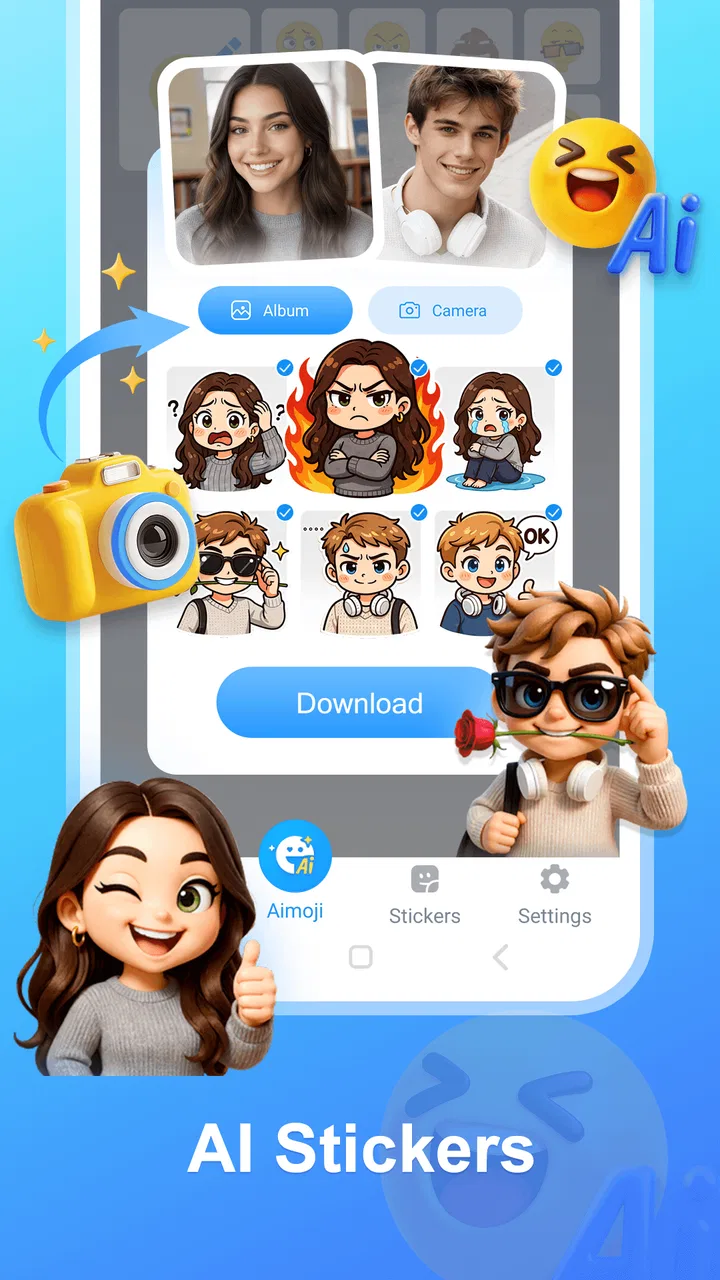
AImoji Keyboard - AI Stickers is a keyboard and sticker-creation app designed to help users make expressive images, emojis, and personalized stickers with artificial intelligence. After installing it, you can generally access the keyboard from your device settings, choose a style or describe an idea, and generate visual content for use in messaging apps and social networks. Available tools and results may vary by device and app version.
02Is AImoji Keyboard - AI Stickers free to download and use?
The app may be available as a free download, but some features can be limited by advertisements, usage quotas, premium templates, subscriptions, or in-app purchases. Before creating many AI stickers, check the pricing information shown in the App Store or Google Play listing and inside the application. This is especially important if the keyboard offers unlimited generations or advanced styles as part of a paid plan.
03Does the app require full access to my keyboard, and is it safe to use?
A third-party keyboard may request permissions that allow it to provide suggestions, stickers, or AI-generated content. Keyboard permissions deserve careful attention because text entered through a keyboard can potentially include sensitive information. Review the app’s privacy policy, avoid typing passwords or confidential data with a third-party keyboard, and enable only permissions you understand. You can switch back to your default keyboard whenever necessary.
04Can I use the AI stickers in WhatsApp, Instagram, and other messaging apps?
AImoji Keyboard - AI Stickers is intended to make sharing visual content convenient, but compatibility can depend on the destination app, operating system, and the way the sticker is exported. Some platforms may receive a sticker directly from the keyboard, while others may require saving an image or using the system share menu. Test the feature with your preferred messenger before relying on it for regular conversations.
05What should I know about AI-generated sticker quality and privacy?
AI-generated stickers can be fun and highly personalized, but results are not always consistent. Prompts may produce unusual details, incorrect text, or artwork that differs from your expectations, so reviewing each creation before sharing is recommended. Also consider what you enter into the generator, particularly names, photos, or personal information. Read the privacy terms to understand whether prompts, images, or generated content may be processed online.
Pros
- Creates personalized AI stickers from simple text prompts.
- Offers a fun way to express emotions in chats.
- Sticker creation is quick and easy for casual users.
- Works with popular messaging apps through keyboard access.
- Regular content updates can keep the sticker library fresh.
Cons
- AI-generated stickers may not always match the requested idea.
- Some features may require a subscription or in-app purchases.
- Keyboard access can raise privacy concerns for cautious users.
- Sticker quality may vary depending on the prompt and style.
- The app may use considerable storage for downloaded sticker packs.

AImoji Keyboard - AI Stickers
Gallery